The Agent now looks at the charts and formatting it creates before it answers. These visual checks let it catch and fix visual problems on its own.
Also new in October:
- Web search for Claude models in bulk tools and GPT functions: Claude cites its sources and can read the pages and PDFs you link to.
- Your plan and credits in ChatGPT and Claude, shown in a card when you ask about your Autosheet account.
- New models: GPT-6.1 Sol, Claude Sonnet 5.5, and Claude Haiku 5.5 in the Agent, and eight models in the bulk tools.
For everything else that changed in October, including fixes, see the release notes.
📸 The Agent checks its charts and formatting 

Until now, the Agent could read your sheet's contents but couldn't see how it looked. It now takes screenshots of the charts and formatted ranges it creates, and checks them before it answers. This helps it find and fix visual issues, such as bars that overlap or a wrong axis scale.
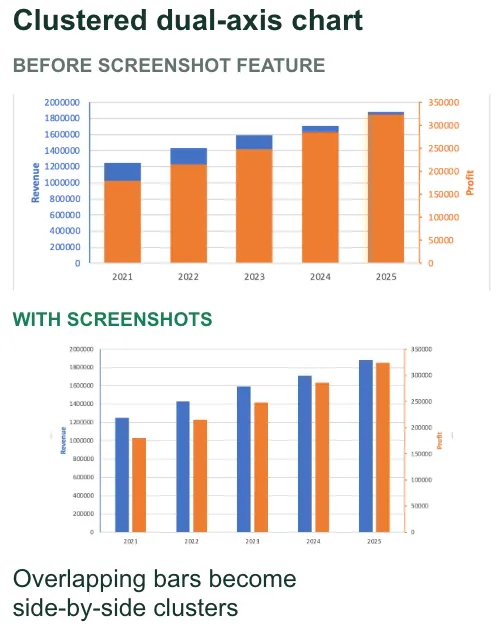
In GPT for Sheets – Autosheet and GPT for Excel – Autosheet, a thumbnail of each screenshot appears under the Agent step that took it, so you can see what the Agent checked. Autosheet's agent also runs visual checks on your Google Sheets spreadsheets when you use it from ChatGPT, Claude, or the Autosheet API, but the screenshots aren't shown in your conversation or returned by the API.
🌐 Claude models can search the web
Anthropic Claude models in bulk tools and GPT functions now have two new settings:
- Web search: Claude searches the web when it can improve its answer, and cites its sources.
- URL context: Claude reads the web pages and PDFs whose URLs you include in your prompt.
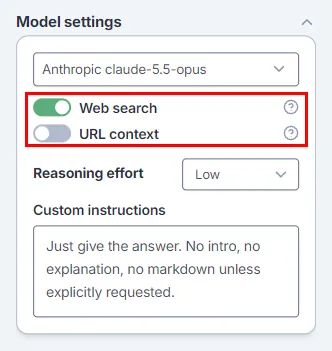
To learn more, see how to search the web with bulk tools and with GPT functions.
💳 Your plan and credits in ChatGPT and Claude
Autosheet MCP lets you use Autosheet's agent from ChatGPT, Claude, or another AI assistant. You can now ask ChatGPT or Claude about your Autosheet account, and it shows a card with your plan and your credits. Depending on your plan, you can buy credits or upgrade from the card. With a subscription, space owners and admins also see the renewal date and the amount of the next invoice.
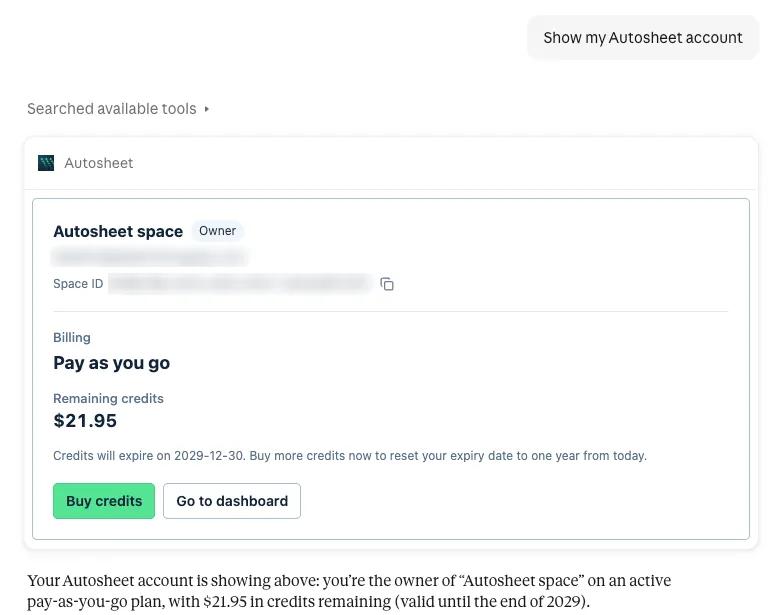
For developers, the Autosheet API has a new GET /v1/account endpoint with the same account information.
🤖 New models 
October brings new OpenAI and Anthropic models across Autosheet.
GPT-6.1 Sol, Claude Sonnet 5.5, and Claude Haiku 5.5 in the Agent
The Agent now offers three new models, ready to use with nothing to set up:
- OpenAI GPT-6.1 Sol, an upgrade to GPT-6 Sol that nearly matches GPT-6 Astra's intelligence on professional work at a lower price.
- Anthropic Claude Sonnet 5.5, a faster, more affordable alternative to Claude Opus 5.5 for everyday spreadsheet work.
- Anthropic Claude Haiku 5.5, Anthropic's fastest and most affordable small model, for quick, high-volume tasks.
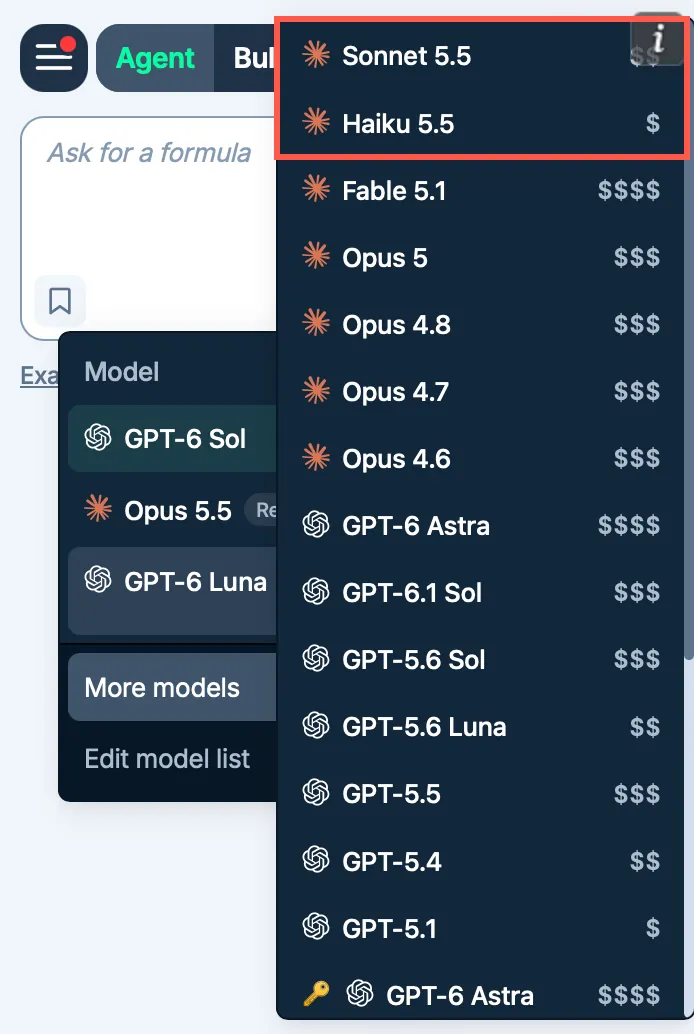
Agent model prices now follow current provider prices. Most Anthropic and OpenAI Agent models now cost more, while Claude Haiku 5.5 and GPT-6 Luna cost less with a subscription. See how credits are consumed for the current prices.
New models in the bulk tools
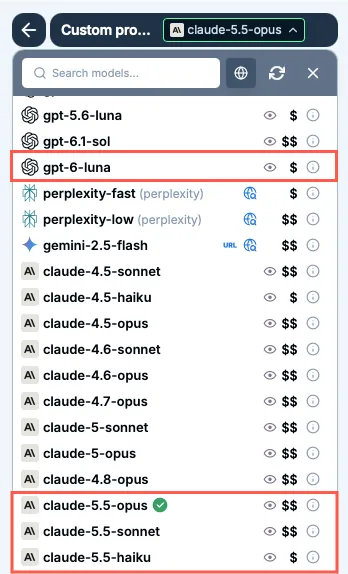
The bulk tools, which process many rows with AI at once, gain new models that are ready to use with nothing to set up:
- OpenAI GPT-6.1 Sol, GPT-6.1 Terra, and GPT-6 Luna.
- Anthropic Claude Opus 5.5, Claude Sonnet 5.5, and Claude Haiku 5.5.
With your own OpenAI or Anthropic API key, you can also use GPT-6 Astra and Claude Fable 5.1.
📖 To go further
Check out our resources to get the most out of Autosheet:
- 📚 Step-by-step guides for Sheets, Excel, Word, and Docs
- 📖 Complete documentation – Find everything you need to know about Autosheet!
- 📝 Our blog articles for e-commerce, SEO, and market research
- 📺 Our YouTube channel with video tutorials
- 📄 Release notes – Or read them directly in the add-ons!
- 🔧 Contact support – Need help? Reach out to our friendly team.