As the agent model of Autosheet in Excel, Google's Gemini 4 Neon scores 96.3% on AutosheetBench, just below Opus 5.5, at nearly twice its AI cost. It is ahead of GPT-6 Astra and every other Excel sidebar add-on, and the only configuration to pass every formatting task.
AutosheetBench is our open benchmark of 187 everyday spreadsheet tasks. Each of Gemini 4 Neon's 187 runs, with its output workbook, transcript and recording, is on Hugging Face in release v1.1.0.
Just below Opus 5.5, above GPT-6 Astra
Gemini 4 Neon passed 180 of the 187 tasks: two fewer than Opus 5.5 and seven more than GPT-6 Astra, the next model in Autosheet in Excel.
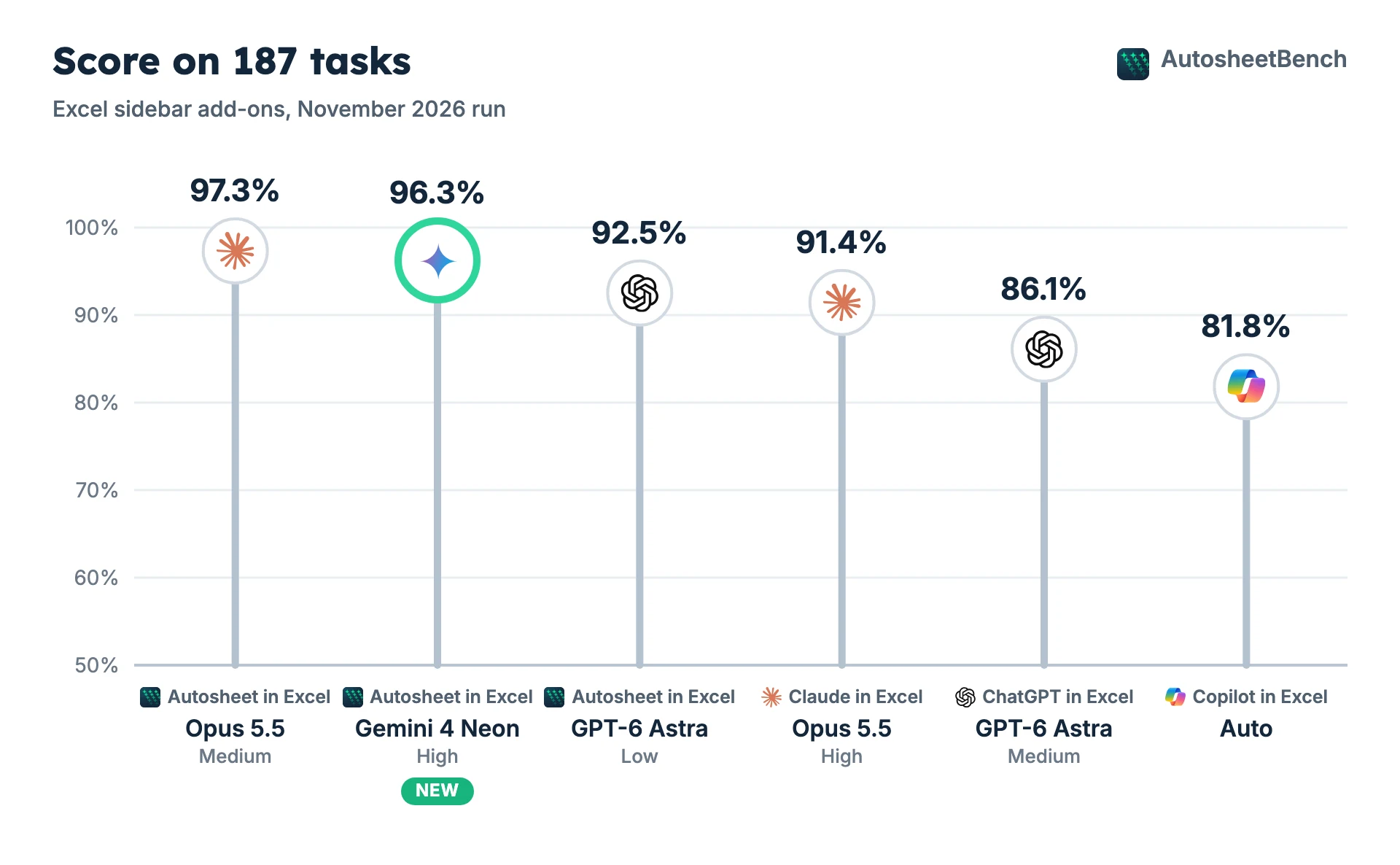
Chart data as a table
Share of the 187 AutosheetBench tasks passed by six of the Excel sidebar add-on configurations, November 2026 run. Each configuration is a product with one model and one reasoning effort level (how much the model thinks before acting).
Configuration | Tasks passed (of 187) | Score |
|---|---|---|
Autosheet in Excel · Opus 5.5 (Medium) | 182 | 97.3% |
Autosheet in Excel · Gemini 4 Neon (High) | 180 | 96.3% |
Autosheet in Excel · GPT-6 Astra (Low) | 173 | 92.5% |
Claude in Excel · Opus 5.5 (High) | 171 | 91.4% |
ChatGPT in Excel · GPT-6 Astra (Medium) | 161 | 86.1% |
Copilot in Excel · Auto | 153 | 81.8% |
We don't compare time per task here: Gemini 4 Neon ran through OpenRouter, which adds a step between Autosheet and Google. We'll add its times once it runs directly through the Gemini API.
Costs nearly 2× Opus 5.5: more reasoning, fewer cache hits
Its AI cost is about 1.9 times Opus 5.5's: it reasons more, at High effort, and gets fewer cache hits. It still costs less than Claude in Excel and ChatGPT in Excel.
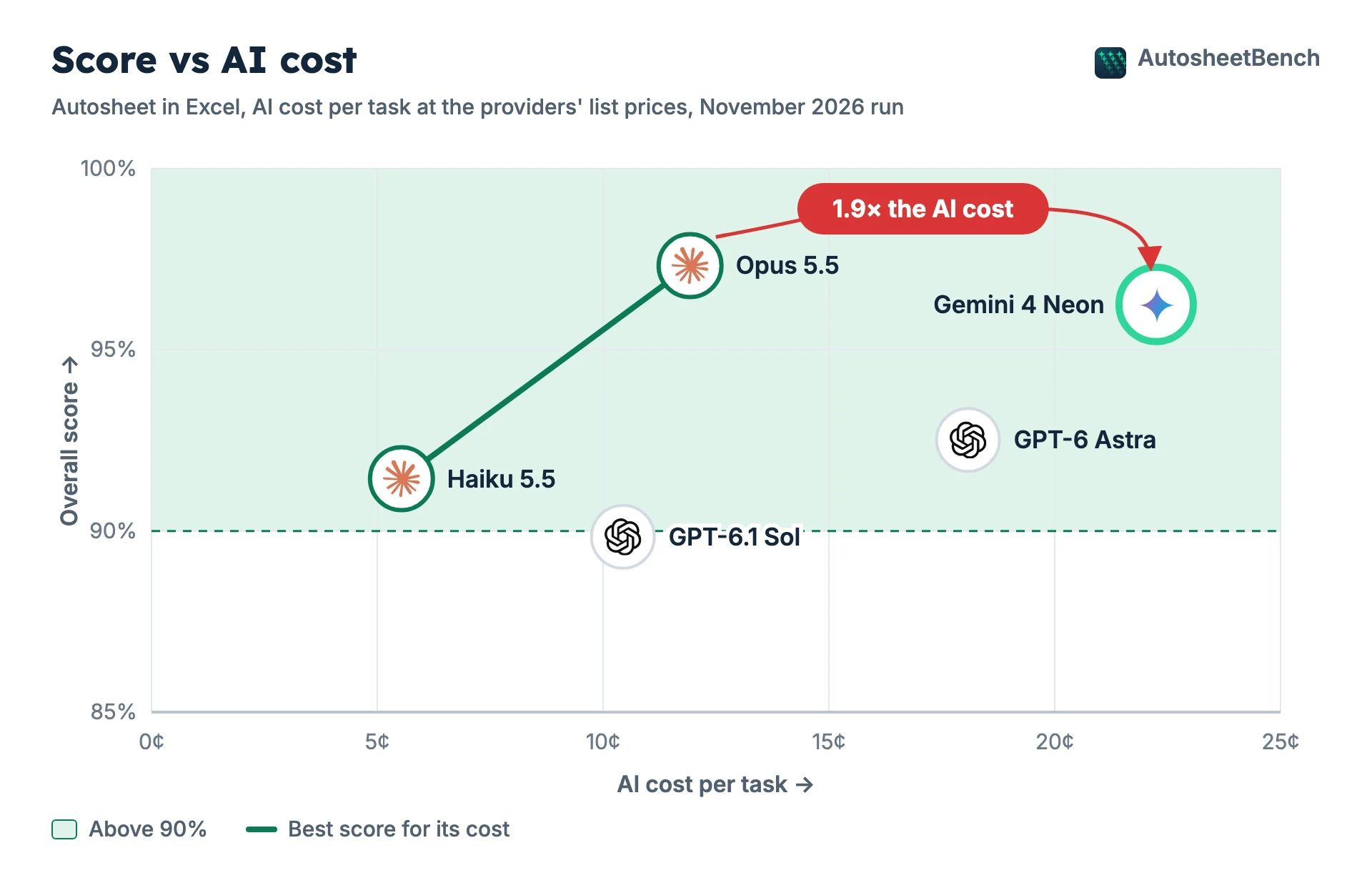
Chart data as a table
Score and AI cost per task of five Autosheet in Excel models on the 187 AutosheetBench tasks, November 2026 run. The AI cost is what the run's model calls cost at the AI providers' list prices, with Gemini 4 Neon's agent calls at OpenRouter's.
Autosheet in Excel model | Score | AI cost per task |
|---|---|---|
Opus 5.5 (Medium) | 97.3% | 12¢ |
Gemini 4 Neon (High) | 96.3% | 22¢ |
GPT-6 Astra (Low) | 92.5% | 18¢ |
Haiku 5.5 (High) | 91.4% | 5.5¢ |
GPT-6.1 Sol (Medium) | 89.8% | 10¢ |
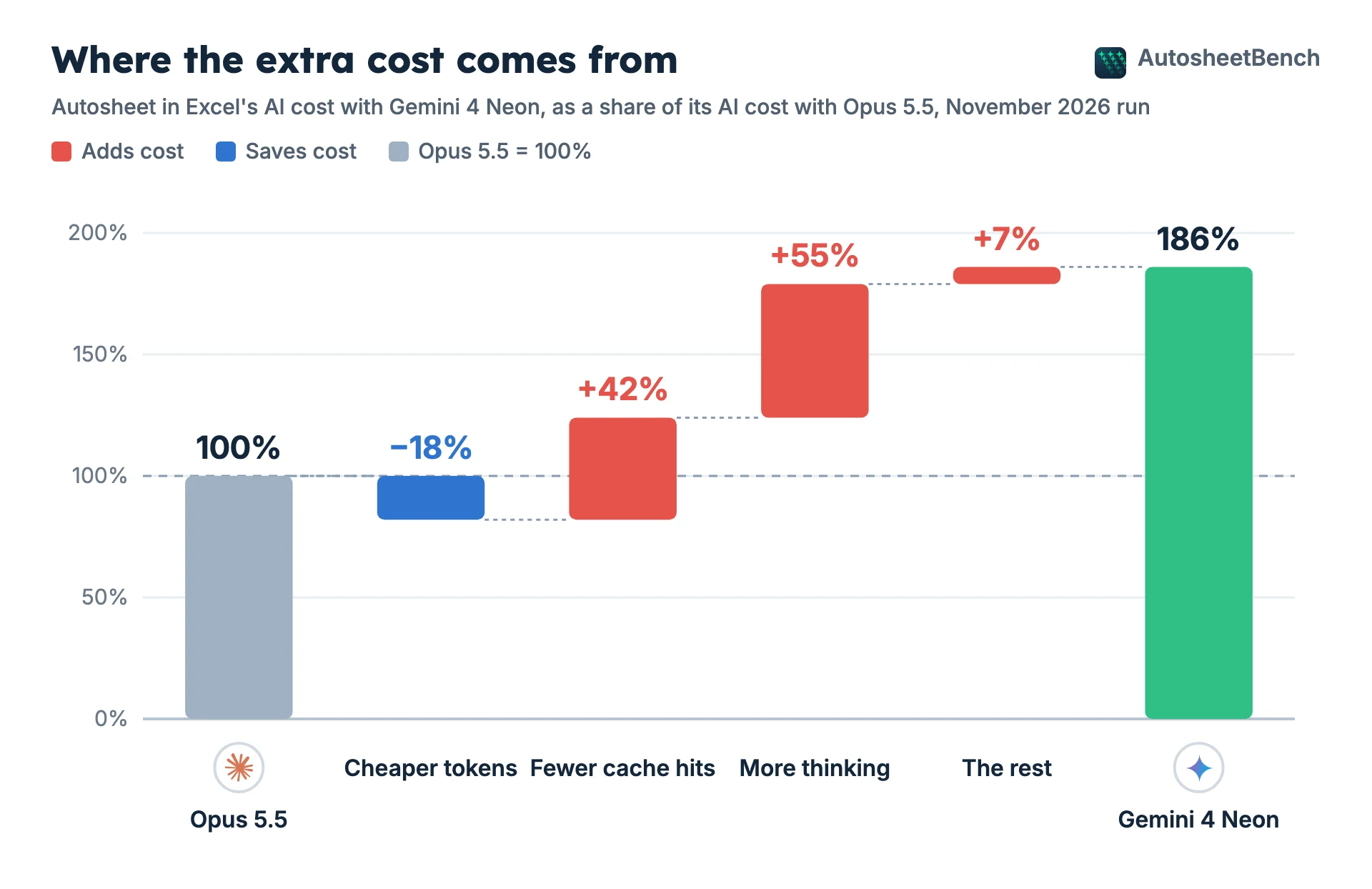
Chart data as a table
Autosheet in Excel's AI cost for the 187 tasks with Gemini 4 Neon (High), as a share of its AI cost with Opus 5.5 (Medium), and what each difference between the two runs adds or saves, in points of Opus 5.5's AI cost. The rest groups input volume, visible output and bulk rows. From the model calls Autosheet logged for both runs, at the AI providers' and OpenRouter's list prices of November 2026.
Step | Change, share of Opus 5.5's AI cost | AI cost, share of Opus 5.5's |
|---|---|---|
Opus 5.5 | 100% | |
Cheaper tokens | −18% | 82% |
Fewer cache hits | +42% | 124% |
More thinking | +55% | 179% |
The rest | +7% | 186% |
Gemini 4 Neon | 186% |
- Cheaper tokens, −18%: $3 and $15 per million input and output tokens, against $4 and $20 for Opus 5.5.
- Fewer cache hits, +42%: 69% of its input came from the cache, against 93%, and a cached token costs a twentieth of a new one.
- More thinking, +55%: 811,776 thinking tokens at High effort, about 4,300 per task, billed as output. That's more than half the gap.
- The rest, +7%: a little less input, a little more visible output and slightly costlier bulk rows: the rows of the bulk tasks, which the agent hands to Autosheet's own bulk models.
#1 alone in formatting, tied for #1 in 3 more
Gemini 4 Neon is the only configuration to pass all 26 formatting tasks. It also scores 100% in formulas, spreadsheet manipulation and bulk content generation, tied for first with other configurations. Its weakest capability is bulk data processing, where it missed 3 of the 17 tasks.
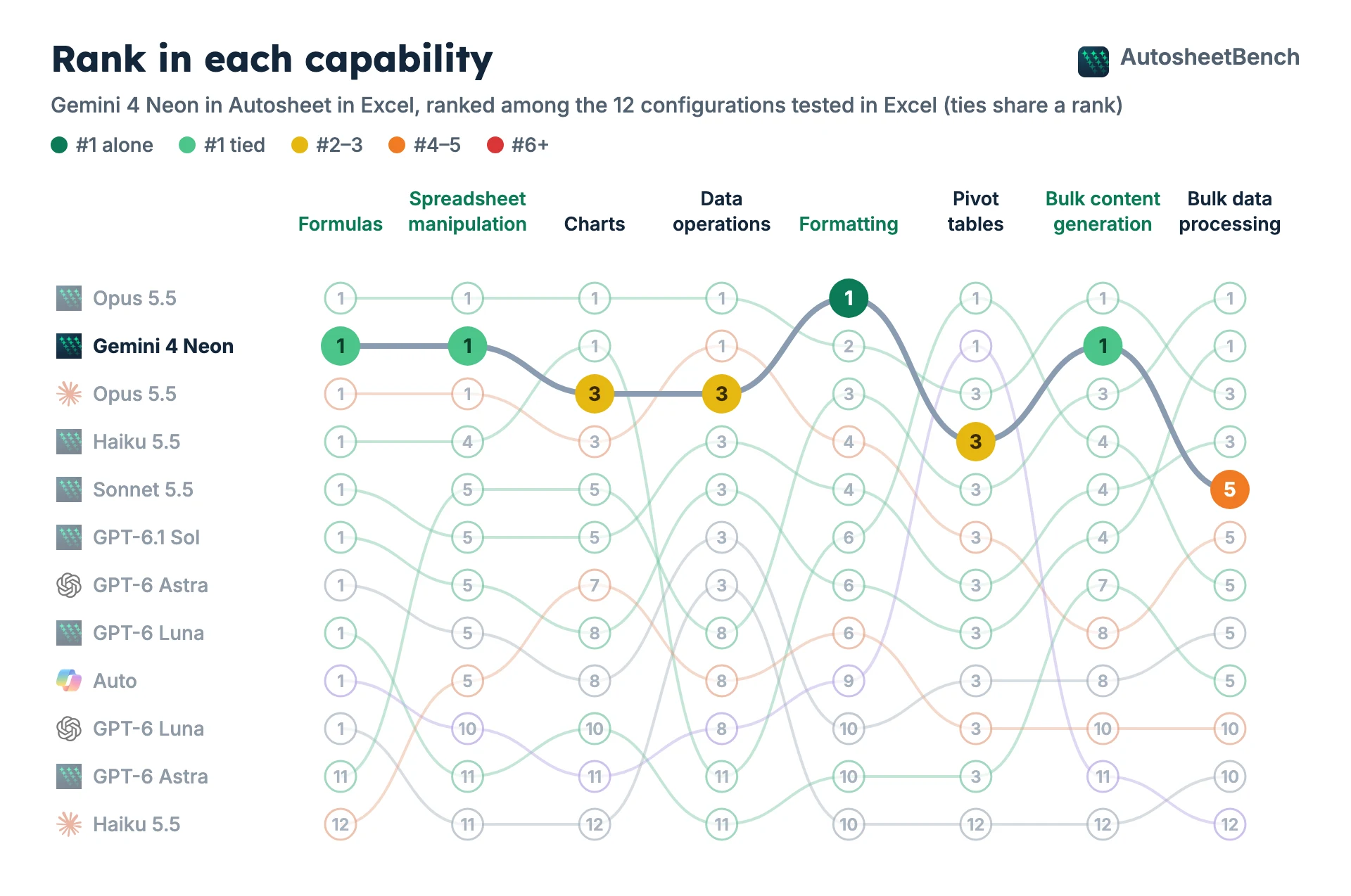
Chart data as a table
Rank of each of the 12 configurations tested in Excel in each capability of AutosheetBench, by tasks passed, November 2026 run. Ties share a rank.
Configuration | Formulas | Spreadsheet manipulation | Charts | Data operations | Formatting | Pivot tables | Bulk content generation | Bulk data processing |
|---|---|---|---|---|---|---|---|---|
Autosheet in Excel · Opus 5.5 (Medium) | 1 | 1 | 1 | 1 | 2 | 3 | 1 | 3 |
Autosheet in Excel · Gemini 4 Neon (High) | 1 | 1 | 3 | 3 | 1 | 3 | 1 | 5 |
Autosheet in Excel · GPT-6 Astra (Low) | 11 | 5 | 5 | 8 | 3 | 3 | 3 | 1 |
Claude in Excel · Opus 5.5 (High) | 1 | 1 | 3 | 1 | 4 | 3 | 8 | 5 |
Autosheet in Excel · Haiku 5.5 (High) | 1 | 4 | 1 | 11 | 6 | 1 | 4 | 5 |
Autosheet in Excel · Sonnet 5.5 (Medium) | 1 | 5 | 5 | 3 | 4 | 3 | 4 | 3 |
Autosheet in Excel · GPT-6.1 Sol (Medium) | 1 | 5 | 8 | 3 | 6 | 3 | 4 | 1 |
ChatGPT in Excel · GPT-6 Astra (Medium) | 1 | 5 | 8 | 3 | 10 | 3 | 8 | 5 |
Claude in Excel · Haiku 5.5 (High) | 12 | 5 | 7 | 8 | 6 | 3 | 10 | 10 |
Autosheet in Excel · GPT-6 Luna (High) | 1 | 11 | 10 | 11 | 10 | 3 | 7 | 5 |
Copilot in Excel · Auto | 1 | 10 | 11 | 8 | 9 | 1 | 11 | 12 |
ChatGPT in Excel · GPT-6 Luna (High) | 1 | 11 | 12 | 3 | 10 | 12 | 12 | 10 |
Example: thousands separators
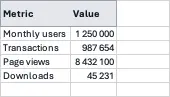
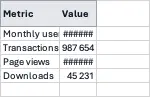
In Add thousands separators, column B holds four numbers, from 45231 to 8432100, and the prompt is:
Add thousands separators to the big numbers.Only 4 of the 23 configurations passed. All 19 failures left column B too narrow for the separated numbers, so the longest show as ###### in Excel or lose their last digit in Google Sheets. Opus 5.5 failed this way, in Autosheet and in Claude in Excel. Gemini 4 Neon widened the column.
Example: a professional-looking table
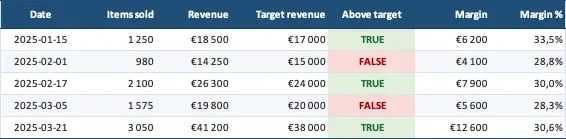
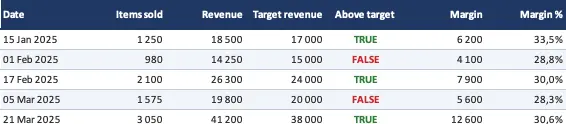
In Make a table look professional, the sheet holds a raw sales table and the prompt, typo included, is:
Make this table look professionnal.The judge expects revenue as currency, the margin as a percentage, the Above target column color coded and every value readable. Only 5 of the 23 configurations passed. Most others formatted revenue as plain numbers, as Claude in Excel did with Opus 5.5, or left the Above target column without colors. Gemini 4 Neon covered every point.
Connected through OpenRouter, built in from December
Gemini 4 Neon isn't built into Autosheet yet, so we connected it through OpenRouter as a custom API endpoint, as a space on the Business or Enterprise plan can. Its effort level, High, is set on OpenRouter's side, not in Autosheet. Its AI cost is its tokens at OpenRouter's prices, plus its bulk rows, which ran on Autosheet's own bulk models as in every other Autosheet configuration. Everything else matched the other configurations: the same tasks, the same Excel runner, the first clean run of each task and the same scoring.
OpenRouter adds a step between Autosheet and Google, which can affect latency and the other timing measures, so the built-in model may not show the same times.
In December, Gemini 4 Neon will be available in Autosheet directly, through Google's Gemini Interactions API, and we will run it on AutosheetBench again then. Until then, you can compare it with any other configuration, task by task, in the head-to-head view.